
Appearance
Call pickup numbers from the KDS serving station
When the kitchen hands out orders at its counter, enable calling in the KDS serving module. Stores that hand out food at the front counter can use the pickup calling module on POS.
Enable pickup calling
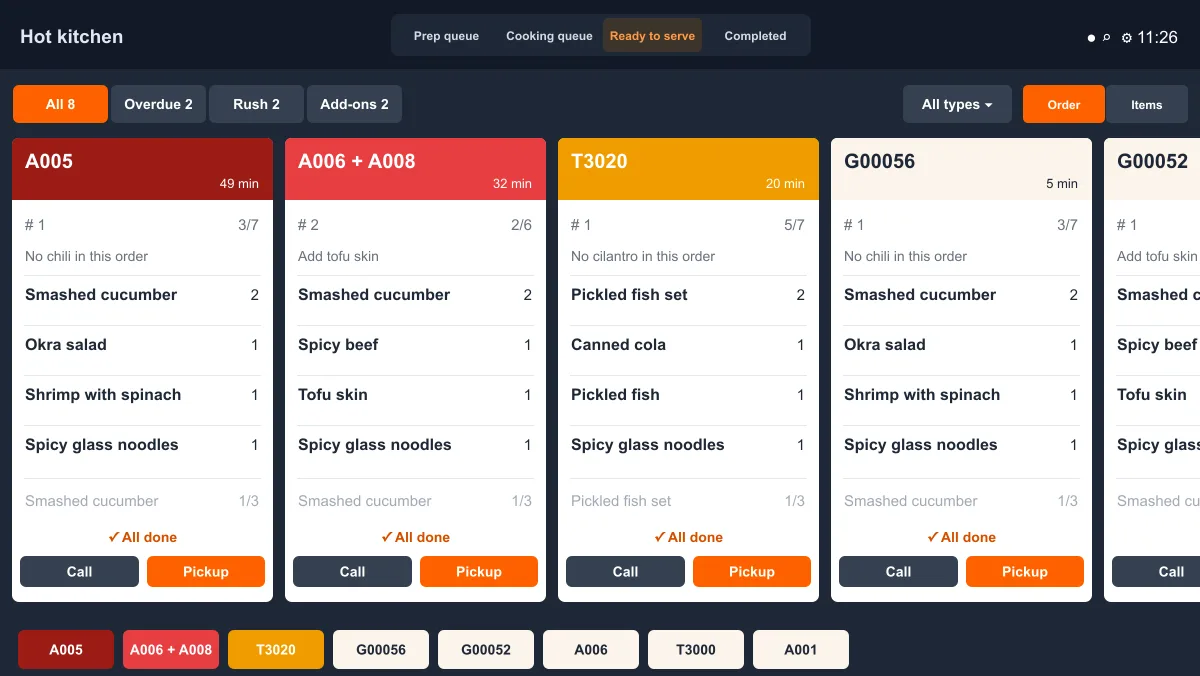
Check that this KDS has the serving role and receives items from the stations it handles. Enable calling mode in the serving module. Open Ready to serve and select Order to find Call and Pickup on the order cards.
Call the guest and confirm pickup
- Find the order in the serving queue and check its full pickup number, items and quantities for the handoff.
- When the food is ready, select Call on the order card. If the store uses CDS, guests can check their number on the pickup screen.
- When the guest arrives at the kitchen counter, hand over the food for that number, then select Pickup to confirm. Update kitchen stages as the work is completed. See Prepare, cook and serve items.
If the call button is missing, check the serving queue, this device's serving role and whether calling mode is enabled. If an order is missing, check that it has reached the serving queue and matches the station and current filters.